bat
A cat clone with syntax highlighting, Git integration, and automatic paging.
Basic usage
bat README.md                          # Display a file with syntax highlighting.
bat src/*.rs                           # Display multiple files at once.
bat -n main.rs                         # Show line numbers only.
bat -A /etc/hosts                      # Show non-printable characters.
curl -s https://example.com | bat -l html  # Pipe from stdin with explicit language.
bat detects the language from the file extension or shebang line. When piped to another
process, bat falls back to plain output like cat.
Syntax highlighting
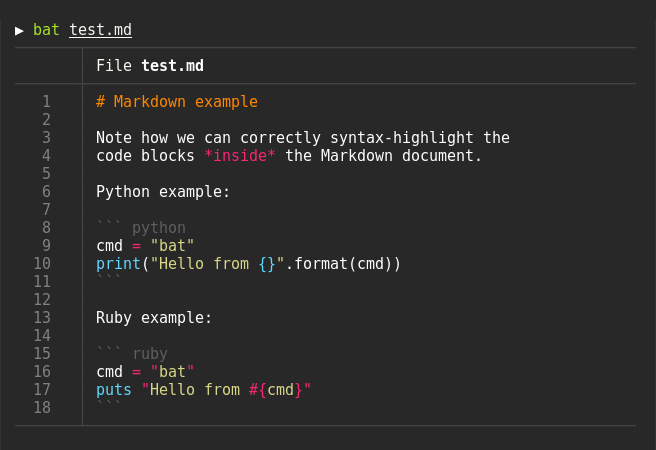
bat supports syntax highlighting for a large number of programming and markup languages:
Git integration
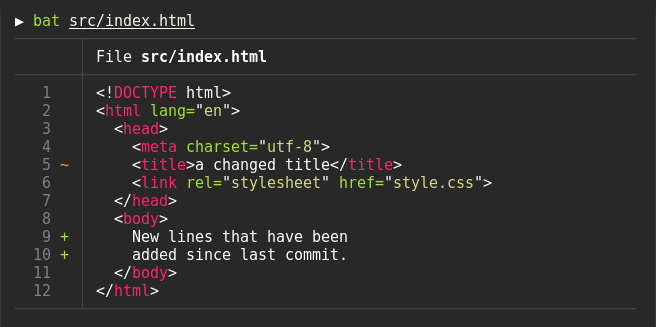
bat communicates with git to show modifications with respect to the index
(see left side bar):
Show non-printable characters
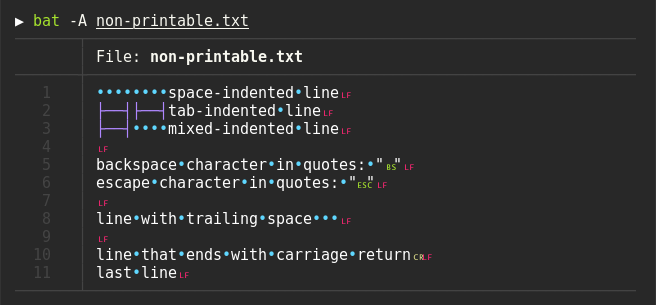
You can use the -A/--show-all option to show and highlight non-printable characters:
Automatic paging
bat pipes its own output to a pager (e.g. less) when output is too large for one screen.
To disable paging, set --paging=never — useful when aliasing cat:
alias cat='bat --paging=never'
Integrations
-
fzf — use
batas a syntax-highlighted file previewer:fzf --preview "bat --color=always --style=numbers --line-range=:500 {}" -
fd — preview search results with
bat:fd '\.rs$' -X bat -
ripgrep —
batgrep(from bat-extras) displays ripgrep results viabat:batgrep needle src/ -
man— colorize man pages by settingMANPAGER:export MANPAGER="bat -plman" -
tail -f— monitor log files with syntax highlighting:tail -f /var/log/syslog | bat --paging=never -l log
bat-extras
bat-extras is a collection of shell scripts that integrate bat with other
tools, including batgrep (ripgrep), batman (man pages), batdiff (git diff), and
prettybat (code formatting).
Debian/Ubuntu note
On older Ubuntu/Debian releases the executable is named batcat due to a package name conflict.
Create an alias or symlink to use it as bat:
alias bat="batcat"
# Or create a symlink:
mkdir -p ~/.local/bin && ln -s /usr/bin/batcat ~/.local/bin/bat
Links
- Stop using cat (Published )
- I Replaced cat With bat. You Might Want To Do The Same (Published )
- 8 Facts That Make the Linux bat Command Better Than cat (Published )
- Enhance Your CLI with bat: A Superior Replacement for cat (Published )
- Drop the Linux cat command for bat (Published )