icdiff
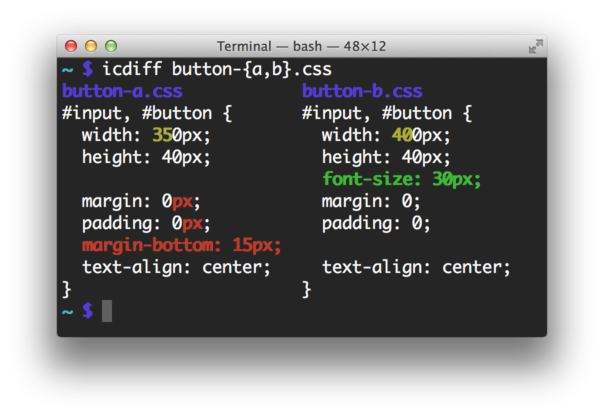
Side-by-side colored diff with intra-line change highlighting.
Website: https://www.jefftk.com/icdiff
Author: Jeff Kaufman
Alternative to: diff
Language: Python
This page last updated:
icdiff improves on the standard diff command by displaying differences in a two-column side-by-side
view with color-coded highlighting, making it much easier to spot what changed at a glance.
Features
- Two-column side-by-side view with color-coded changes
- Intra-line highlighting to show exactly which characters changed
- Optional line numbers
- Recursive directory comparison
- Integration with Git, Subversion, and Mercurial via
git icdiff - Customizable color map for different diff elements
- Context line control and whole-file display option
- Whitespace highlighting
- Support for multiple file encodings
Notable options
--highlight: Changes background color instead of foreground for highlighted diffs--line-numbers: Adds line numbers to the output--recursive: Compares subdirectories--whole-file: Displays entire files rather than just changed sections--color-map: Customizes the color scheme for different diff elements
Installation
Available via pip install icdiff, apt install icdiff, brew install icdiff, AUR, and Nix.