vgrep
A user-friendly pager and interactive front-end for grep, git-grep, and ripgrep with editor integration.
Project: https://github.com/vrothberg/vgrep
Author: Valentin Rothberg
Alternative to: grep (See 10 others)
Language: Go
This page last updated:
vgrep wraps grep, git-grep, or ripgrep and presents results as a numbered,
scrollable list. Each match gets an index so you can open any result
directly in your editor — just type the number and vgrep launches
$EDITOR at the right file and line.
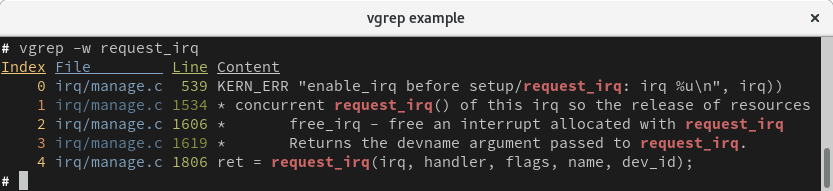
After a search, vgrep drops into an interactive shell where you can refine results with a new regex, display surrounding context lines, view a directory tree of match counts, filter down to specific indexes, or run a fresh grep — all without leaving the tool. Results are cached so you can re-examine a previous search instantly.
vgrep also integrates with fzf via shell functions for Bash and Fish, enabling fuzzy selection over search results for an even faster workflow.
Basic usage
grep -rn "pattern" .  | vgrep   # Pipe grep output into vgrep.
git grep "pattern"    | vgrep   # Works with git grep.
rg "pattern"          | vgrep   # Works with ripgrep.

# Interactive shell commands:
context 5             # Show 5 lines of context around each match.
refine <regex>        # Filter current results by a new pattern.
tree                  # Show match counts grouped by directory.
files                 # Show total matches per file.
3                     # Open result #3 in $EDITOR.